Binary to Decimal
Convert binary numbers to decimal notation.
Share on Social Media:
This online Binary to Decimal converter is designed to convert a sequence of bytes in binary format into decimal numbers.
How to Use
Input Text:
- Type or paste the sequence of binary numbers (separated by spaces) you want to convert into the designated input field.
Upload File:
- Alternatively, click on the "Upload File" button to select a text file from your device.
Convert to Decimal:
- Click the "Convert to Decimal" button to initiate the conversion process.
View Text Output:
- The resulting sequence of decimal numbers will be displayed in the output area.
Copy to Clipboard:
- Click the "Copy to Clipboard" button to easily copy the decimal numbers.
Save as Text File:
- Click the "Save as TXT" button to download the decimal numbers as a text file to your device.
Binary Number Notation
Binary notation is a base-2 numeral system that uses only two digits: 0 and 1. It is commonly used in computing and digital electronics because of its simplicity in representing data using bits (binary digits). Each digit in a binary number is called a bit, and the place values are powers of 2. The rightmost bit represents 2^0, the next bit to the left represents 2^1, and so on.
Decimal Notation
Decimal notation, on the other hand, is a base-10 numeral system that uses digits 0 through 9. It is the standard system for denoting integer and non-integer numbers. Each digit in a decimal number represents a power of 10, with the rightmost digit representing 10^0, the next digit to the left representing 10^1, and so forth.
Conversion from Binary to Decimal
To convert a binary number to decimal we use the positional notation system, where each binary digit's position represents a power of 2. Here's how we can convert 01000001 to decimal:
Binary: 0 1 0 0 0 0 0 1 Position: 7 6 5 4 3 2 1 0
Now, for each digit that is 1, you add 2 raised to the power of its position to the total sum. In this case:
Decimal = (0 * 2^7) + (1 * 2^6) + (0 * 2^5) + (0 * 2^4) + (0 * 2^3) + (0 * 2^2) + (0 * 2^1) + (1 * 2^0) = 0 + 64 + 0 + 0 + 0 + 0 + 0 + 1 = 65
So, the decimal equivalent of the binary number 01000001 is 65.
Binary to Decimal Conversion in Programming Languages
Here are examples of binary to decimal conversion functions in popular programming and scripting languages:
C/C++:
In C and C++, you can use the strtol function to convert a binary string to a decimal integer.
#include /* printf */#include /* strtol */int main() { char binaryNumber[] = "1011"; int decimalNumber = strtol(binaryNumber, NULL, 2); printf("%d\n", decimalNumber); // Output: 11 return 0;}
Edit & run on cpp.sh
Java:
In Java, you can use the parseInt method from the Integer class.
// parseInt (String s, int radix)// Returns the integer value represented by the string argument in// the specified radix (base).public class BinaryToDecimal { public static void main(String[] args) { String binaryNumber = "1011"; int decimalNumber = Integer.parseInt(binaryNumber, 2); System.out.println(decimalNumber); // Output: 11 }}
PHP:
In PHP, the bindec or base_convert functions can be used for binary to decimal conversion.
// bindec(string $binary_string): int|float$binaryNumber = "1011";$decimalNumber = bindec($binaryNumber);echo $decimalNumber; // Output: 11
Edit & run on OnlinePHP.io
// base_convert(string $num, int $from_base, int $to_base): string$binaryNumber = "1100";$decimalNumber = base_convert($binaryNumber, 2, 10);echo $decimalNumber; // Output: 12
Edit & run on OnlinePHP.io
Python:
In Python, you can use the built-in int function with base 2.
# class int(x, base=10)binaryNumber = "1011" decimalNumber = int(binaryNumber, 2) print(decimalNumber) # Output: 11
Edit & run on PythonSanbox.com
Ruby:
In Ruby, you can use the to_i method with base 2.
# to_i(base=10) → integerbinaryNumber = "1011" decimalNumber = binaryNumber.to_i(2) puts decimalNumber # Output: 11
Edit & run on Try Ruby Playground
JavaScript:
In JavaScript, the parseInt function is used with base 2 for binary to decimal conversion.
// parseInt(string, radix)let binaryNumber = "1011";let decimalNumber = parseInt(binaryNumber, 2);console.log(decimalNumber); // Output: 11Edit & run on runjs.co
Perl:
In Perl, the oct function can be used with the binary prefix.
# oct EXPR# If EXPR starts off with 0b or b, it is interpreted as # a binary string.my $binaryNumber = "1011"; my $decimalNumber = oct("0b$binaryNumber"); print $decimalNumber; # Output: 11
Edit & run on Tio.run
PowerShell:
In PowerShell, the [Convert]::ToInt32 method can be used for binary to decimal conversion.
$binaryNumber = "1011" $decimalNumber = [Convert]::ToInt32($binaryNumber, 2) Write-Output $decimalNumber # Output: 11
Edit & run on Tio.run
These examples demonstrate how to perform binary to decimal conversion in various languages, each using its specific function or method for the task.
Binary to Decimal Conversion in Excel / Google Sheets
In Excel / Google Sheets the BIN2DEC function converts a signed binary number to decimal format.
BIN2DEC(signed_binary_number)
Where signed_binary_number is a signed 10-bit binary value to be converted to decimal, provided as a string.
Example: =BIN2DEC(1100100)
Binary to Decimal Conversion with Windows Calculator
In Windows Calculator, you can perform binary to decimal conversion using the Programmer mode. Here are step-by-step instructions:
Open Calculator:
- Press the Win key on your keyboard to open the Start menu.
- Type "Calculator" and press Enter to open the Calculator app.
Switch to Programmer Mode:
- In the Calculator window, click on the "Hamburger" icon (three horizontal lines) in the top-left corner.
- From the drop-down menu, select "Programmer."
Select Binary Mode:
- In the Programmer mode, you'll see different numeral system options at the top left of the calculator screen. Select "BIN" for binary.
Enter Binary Number:
- Enter your binary number using the calculator keypad. For example, if your binary number is "1011," type "1011" on the calculator.
View Decimal Result:
- After entering the binary number, you can see the decimal value next to the "DEC" option. You can also click on the DEC option to display the decimal value on the result line.
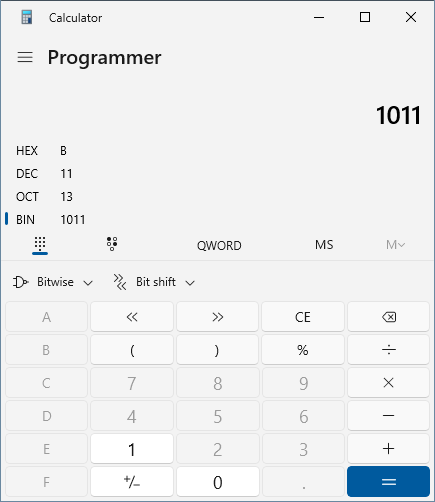
Remember that this process is specific to the Windows Calculator app, and other calculator applications or tools may have different procedures for binary to decimal conversion.